This Is Why Joomla Is The Best CMS Available

When you think about bringing your business online, you start with very basics i.e. A Website. You have to go through lots of research because of the availability of hundreds of options for website development. Then, how to choose the best? To bring you out from this compulsion, we are here to discuss an amazing CMS i.e. J O O M L A which is a great fit for any sort of web application development. To make our case stronger we have described a few astonishing features below.

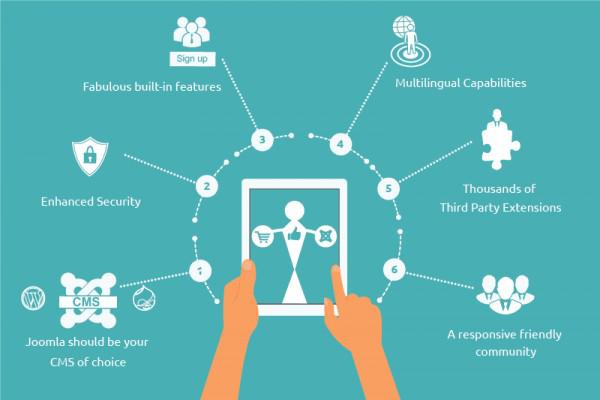
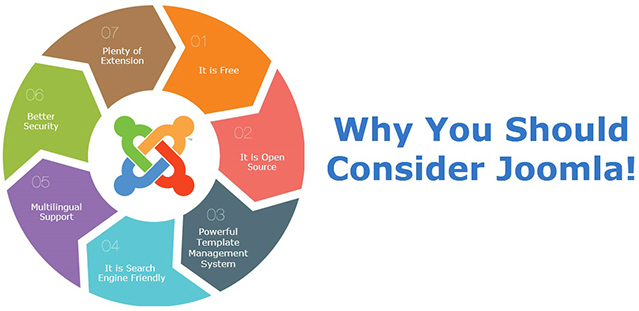
Why to Choose Joomla

An Award-winning CMS…. It sounds great, isn’t it?

20 awards in 14 years…. A Big Deal!! Joomla shows its strength enabling you to build powerful cloud-based solutions, websites and online applications for all vertical. These awards and achievements are also because of extra-ordinary Joomla development services.

Why Joomla Is The Best CMS

Joomla is Universal!! …… Right from Installation, it is Multilingual.

This claim is authentic and legitimate because of 75+ languages available in Joomla. You can install Joomla in a language of your choice. In addition, the language override in Joomla is so simple; you can change the text to suit your requirements without any Joomla web development or coding knowledge.

Joomla is Secure!!…… Never compromise when it comes to your data.

All violations of essential personal or business data are brutalizing. Compromised security is the biggest concern of any organization or individual. To ensure enhanced and assured security, Joomla websites are equipped with 2 excellent security measures:

  • Two Factor Authentication (2FA): This is an inbuilt Joomla security feature that quells the efforts of a security breach using any unauthorized access or hacking into the password security.
  • B-Crypt Algorithm: This is a hashing algorithm used by Joomla to scramble all of the passwords in your database – ensuring better encryption against hackers.

SEO Friendly!! ……. Joomla does it for you as a complementary.

Inbuilt Search Engine Optimization (SEO) allows Joomla based web applications to improve their volume and quality. Joomla follows all the latest SEO norms in the most appropriate way possible to provide the best output for your site.

As Expandable as nothing……. with 7,000+ extensions.

One of the largest Global development communities supports the Joomla CMS because of the number of extensions (Components, modules, plugins, Templates, and Languages). You can add many features as and when require using these extensions and can accommodate your unique Joomla web development needs, leaving you free to focus on designing a great website.

Joomla Templates are exceptionally Handsome……. with World-Class User Interface (UI)

Joomla is equipped with cross-functional, diverse and feature-rich templates available online. These largest bunch of templates allow you to customize the layout of your Joomla Website and saves organization valuable time and money. All these templates are responsive while using mobile, tab, notebook or any size of PC.

Joomla is Effortless…… It’s never beyond your Ken.

Joomla requires minimal or negligible effort to engineer it. It is really easy to understand and very handy to manage. You will be addicted to work on it within no time. With a heap of online Joomla tutorials, created by Joomla experts, you never feel unfamiliar with any feature, functionality and other aspects of Joomla. You can find anything related to Joomla website development.

Revealing a Leading Face of Restaurant Management Tool!!!

Guess What?!? I have got something exciting to tell you: We are coming with the latest release of our one of the best, leading and up-to-date online restaurant tool i.e. vRestaurant.

A few months back, it was a myth to have endless features within one portal. Now with the assistance of our super developer brains, we are making your dream comes true to manage everything centrally from one portal with ease and simplicity.

vRestaurant’s online ordering and reservation platform is your space to explore and explain your brand. It’s the first interaction people have with you online. It not only opens new revenue streams for you but also offers various customer engagement opportunities.

Another great way to make your restaurant stand out is to use the vRestaurant portal as Review and Rating platform. One can easily share his/her experience by reviewing the restaurants available. Customer’s feedback is the final word for an owner of a Restaurant to make an assessment of his services or to find better ideas which can lead to an overall improvement in infrastructure, menu, features, and services.

vRestaurant is stuffed with lots of cutting-edge features like Online Menu Ordering, Online booking and reservation, list/search restaurants and menu dynamically, rate & review system for restaurant & menu with category reviews, deals and coupons to woo customers, different Dashboard for Restaurant owners, subscription for Restaurant owners, etc.

https://www.wdmtech.com/vrestaurant

WDMtech is one the leading company to serve you the latest, high-tech and wide range of online portals and platforms that make you comply with today’s business needs. vRestaurant is also the mirror of our 10 years of experience in the development of technology.

Taste a demo of vRestaurant and enjoy it to shoot your business like anything.

http://joomlawings.com/vrestaurant

10 Commandments To Become a UI Hot Stuff! From a Clumsy Noob!

Hey! The world is all beautiful, colorful and natural so your User Interface should be. It is one of the most important parts of any website or application. Users usually don’t notice it when it performs well. But in case of errors and poor interface users lose the interest in the product. To create successful user interfaces, most designers follow the basic principles of interface design. Interface design principles represent high-level concepts that are used to guide software design. High level! Not that much

10 commandments are:

1. Place users in control of the interface

  • The user must be able to reverse the action which allows the user to backtrack without the constant fear of failure.
  • Create an easy-to-navigate interface during the website development process, so that user should enjoy exploring the interface even in case of complex software or loads of options available.
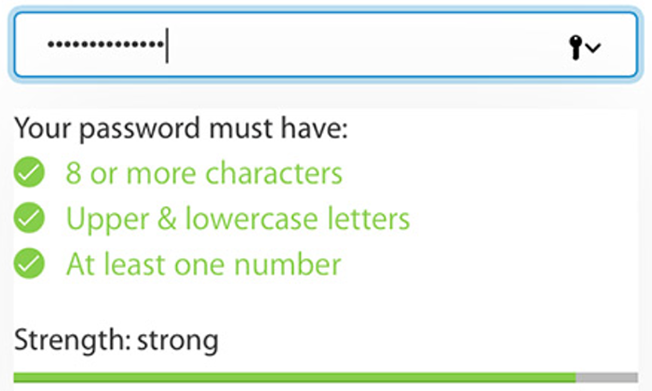
  • Acknowledgment and feedback are the necessary needs of today’s complex and messy software. For example, when filling out a password field in the signup form, the interface might inform users of the requirements for their password.
  • Using progress bars or other indicators makes the user patience while software or app is supposed to be doing something.
  • Accommodate users with different skill levels by providing shortcuts, hotkeys and fast paths for expert users. For newbie users tutorial and explanation must be there.

2. Make it comfortable to interact with a product

  • Eliminate all elements and irrelevant information that is not helping your users.
  • Don’t push users to enter same info multiple time or vast info to fill.
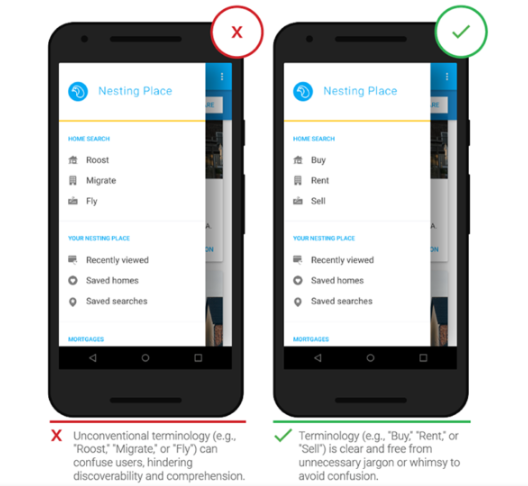
  • Use terms throughout the interface that users can understand, rather than system or developer language.
  • Fitts’s law states that the time to acquire a target is a function of the distance to and size of the target. This means that it’s better to design large targets for important functions (big buttons are easier to interact with).
  • We should design an interface by keeping the requirement of users of all abilities, including those with low vision, blindness, hearing impairments, cognitive impairments etc.
  • To simulate real world on digital interface metaphors play vital roles. For example, when asking debit card details for payment, you can use a similar picture of the real card as an example.
  • Errors should be engineered as precise, polite, and constructive. If possible, errors must include the exact issue and solution.

3. Reduce cognitive load

  • Cognitive load is the amount of mental processing power required to use a product. It’s better to avoid making users think/work too hard to use your product.
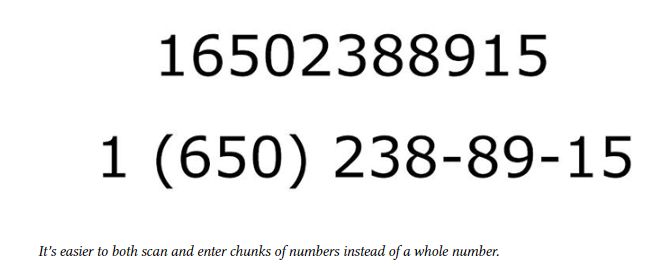
  • According to a research, human working memory can handle seven-plus-or-minus two “chunks” of information while we’re processing information (Theory of CHUNKING by George Miller).
  • Use 3 click rule to reduce the number of actions required to complete the task. The user of a product should be able to find any information with no more than three mouse clicks.
  • Visibility of information and accessibility with ease makes the user recall and recognize what he saw recently in a software.

4. Make user interfaces consistent

  • The main idea of consistency is the idea of transferable knowledge — let users transfer their knowledge and skills from one part of an app’s UI to another, and from one app to another app to have the consistency in website design.
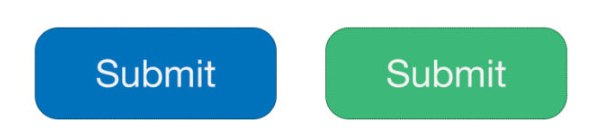
  • Don’t change the consistent look of visual styles within your product for no reason. For example, a Submit button on one page of your site should look the same on any other page.
  • The principle of least surprise is the Functional consistency (Consistency of behavior). The behavior of interface controls, such as buttons and menu items, should not change within a product.
  • To fulfill user requirements follow platform conventions, don’t reinvent patterns, and don’t try to reinvent terminology.

5. Light comes from the sky

  • Shadows are invaluable cues in telling the human brain what user interface elements we’re looking at. When the light comes from the sky, it illuminates the tops of things and casts shadows below them.
  • Same in the website development, home page tops of stuff are lighter, the bottoms are darker. Our screens are flat, but we’ve invested a great amount of art into making just about everything on them appear to be 3-D.

6. Black and white first

  • To simplify the complex elements of the interface we need to first implement Grayscale responsive website design then should go for the colored version.
  • It is better to start making the app beautiful and usable in every aspect, but without the use of colors, which is a little harder. So, add color after grayscale with a very purposeful and meaningful way.
  • In some of the cases, it is not necessary to have a grayscale version or interface. Some designs are related to specific attitude — “sporty”, “flashy”, “cartoony”, etc. — need a designer who can use color extremely well. But most apps don’t have a specific attitude except clean and simple. Those that do are admittedly much harder to design.

7. Double your whitespace

For well-designed UI look, you need to add in a lot of breathing room. Sometimes in a ridiculous amount. For this designer needs to remind few things in his mind:

CSS, HTML, and Whitespace

  • If you, like me, are used for the formatting of the CSS, where mostly the default is no whitespace, don’t try those poor methods and train yourself for new ones.
  • While designing a software start using whitespace as the default. Everything starts as whitespace until you take it away by adding a page element.
  • Starting with a blank page means starting with nothing but whitespace. You think of margins and spacing right from the very beginning. Everything you draw is a conscious whitespace-removing decision.
  • Starting with a bunch of unstyled HTML means starting with content. Spacing is the afterthought. It has to be explicitly stated.

8. Learn the methods of overlaying text on images

For reliably and beautifully overlaying text over images we have certain concrete methods.

Method 1: Apply text directly to the image

  • The image should be dark.
  • The text has to be white.
  • Test it at every screen/window size to make sure it’s legible

Method 2: Overlay the whole image

  • It is the trendiest method today to overlay the image.
  • For bright images, translucent black is the best option also you can find colored overlays as well.

Method 3: Put text in a rectangle

Semi-transparent black rectangle and lather on some white text allow any image underneath and text will be clearly visible and legible, you can also add some colors.

Method 4: Blur the image

To make the overlaid text more legible we need to blur part of the underlying image. You can also use the out-of-focus area of a photo as the blur.

Method 5: Floor fade

  • The floor fade is when you have an image that subtly fades towards black at the bottom, and then there’s white text written over it.
  • To look most natural to our eye, the image has to be slightly darker at the bottom, just like everything else we ever see.

9. Make text pop — and un-pop

The styling of text matters the most preferably larger and lighter. Text includes multiple features to be reminded like Size (bigger or smaller), Color (greater contrast or lesser; bright colors draw the eye), Font weight (bolder or thinner), Capitalization (lowercase, UPPERCASE, and Title Case), Italicization, Letter, and Margins. For a visible and clear website design, text plays the most important role in improving UI and UX.

Up-pop and down-pop

    You can divide all the ways of styling text into two groups:
  • Styles that increase the visibility of the text. Big, bold, capitalized, etc.
  • Styles that decrease the visibility of the text. Small, less contrast, less margin, etc.

Selected and hovered styles

Styling selected elements and hover effects are another round in the same game— but more difficult. Usually, changing font-size, case, or font-weight will change how large of an area the text takes up, which can lead to seizing hover effects.

10. Only use good fonts

The clean and simple font is the necessity of a well-designed UI. Sites having unique features include very distinct text depends upon the flavor like sports, online games, and business sites etc. There are some useful resources for a smooth and soothing website design:

    There are some useful resources:
  • Beautiful Google web fonts. This is an awesome showcase of how good Google Fonts can look. I’ve returned to this simple page for inspiration at least a dozen times.
  • Font Squirrel. A collection of the best fonts available for commercial use, and totally free.
  • Type kit. If you are on Adobe Creative Cloud (i.e. subscription Photoshop or Illustrator, etc.), then you have free access to a ton of amazing fonts. And yes, Proxima Nova is included.

Proven Approach for Evangelizing UX

We often don’t know why we do things

One of the research studies proving this point was carried out around 50 years back by psychologists Timothy Wilson and Richard Nisbett. The researchers placed a table outside a store with a signboard that read, “Consumer Evaluation Survey: Which is the best quality?” On that table, there were four pairs of ladies stockings, labeled A, B, C and D from left to right. Most of the people i.e. 40% preferred D, and fewest people i.e. 12% preferred A.

The fact was, all the pairs of stockings on a table were identical. The reason most people preferred D was simply a position effect: the researchers knew that people show a marked preference for items on the right side of a display (another finding from psychology). But when the researchers asked people about the stockings that they chose, people identified an attribute of their preferred pair, such as its superior knit, sheerness or elasticity.

The researchers also asked people if they would have been influenced by the order and placement of the items, but with one exception (a psychology student who had just learned about order effects) nobody thought this had affected their choice. Instead, people made up plausible reasons for their choice.

So, there are a few very important factors which should be reminded while working on UX during mobile application development

    , website development and design, etc.
  • Size and Location
  • Attention (Hick’s Law and Serial Position Effect)
  • Empathy Mapping
  • Positive Reinforcement
  • Facts to believe

UX is also about the size and location of controls

According to Fitts’ law (named after the psychologist Paul M Fitts), the time required to rapidly move to a target is a function of the distance to and the size of the target. This applies to both desktop user interfaces as well as touchscreen interfaces. In practice, Fitts’ Law doesn’t mean you should just make big buttons but that you should increase the clickable area. For example, allow a user to click on the text label next to a form field to place their cursor in the field for data entry.

Attention (Towards User’s Psychology)

There are different sorts of attention, based on the situation and the strength of the stimuli.

As a UX designer, we must be very well aware of the important factors of in-depth changes. These changes within the UX environment always draw the attention of the user. With this kind of expertise and experience in website development and design, we can sensibly design user experiences that must be the best fit for the User.

It could be a CMS customization or mobile application development or any other sort of customized software solution:

As a UX Designer, we should better know that during the learning and working activities the users need to use their constant attention. It means that everything on the user interface should deliver this purpose.

Too Many Options and Choices (Hick’s Law)

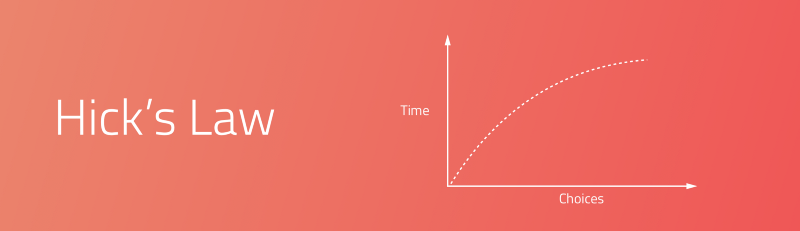
More choices and options need more mental load. “It describes the time it takes for a person to make a decision as a result of the possible choices he or she has: increasing the number of choices will increase the decision time logarithmically.”

Too Many Options and Choices (Hick’s Law)

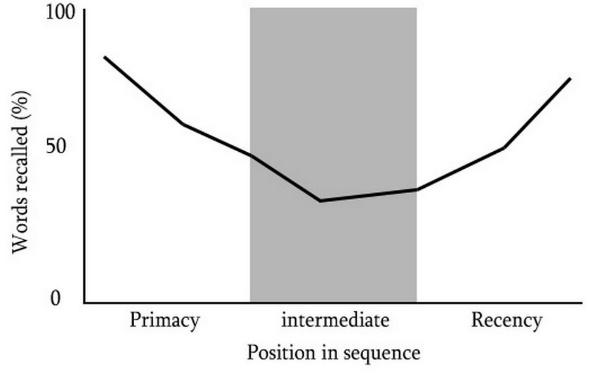
Serial Position Effect: A way to create better user interfaces

The serial position effect, a term coined by Hermann Ebbinghaus, a German psychologist and a leader of memory research, describes how the position of an item in a sequence affects recall accuracy. There are two main concepts involved in the serial position effect:

  • The Primacy Effect: Items that are presented at the beginning of a list are recalled with greater accuracy than items in the middle of a list.
  • The Recency Effect: Items that appear at the end of a list are also more likely to elicit better recall than items presented in the middle of a list.

Serial Position Effect: A way to create better user interfaces

There are a few ways you can design better UX by understanding how the serial position effect affects your user:

  • We should maintain information related to tasks within the User Interface.
  • Include cues and notion in the User Interface.
  • Limit the amount of recall required.
  • Emphasize and highlight key information in the beginning and end.

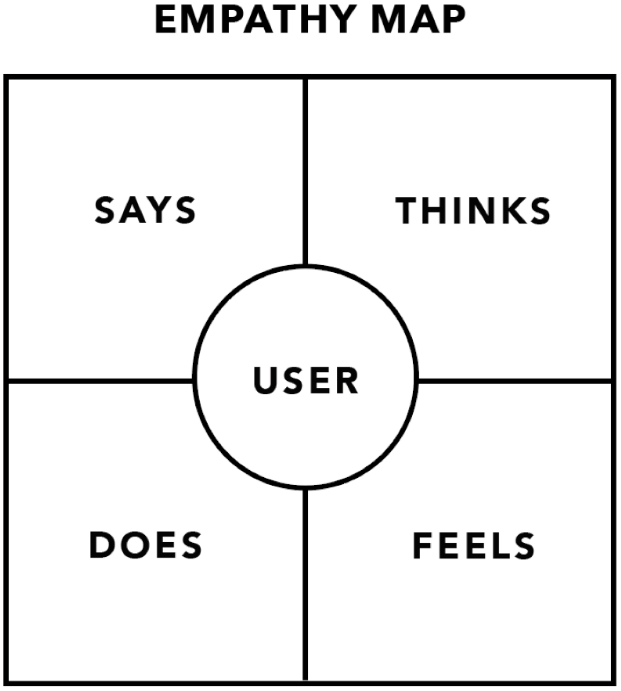
Empathy Mapping:

s the name suggests, empathy maps simply help us building empathy with our end users. Based on real data and when combined with other mapping methods, they can:

  • Remove the bias from designs and brings the team on a single, shared vision of the user.
  • Brings out weaknesses in the research and understanding of the design.
  • Brings to light new user requirements that the user themselves may unaware of.
  • Need to understand what influence the user’s behavior.
  • Guide us toward meaningful innovation and advancement.

Empathy Mapping

“Pay attention to what users do, not what they say.”

— Jakob Nielsen

Using a Positive Reinforcement In UX

Positive reinforcement is only encouraging an action by rewarding it.

Positive reinforcement can be used in two ways. The first, if you are making use of an unorthodox website design features, a contemporary navigation, or out of the way architecture, you can train your users to handle it appropriately and master it by rewarding their interaction with it.

The second, and much more across the board, the application is to impose it on the platform as a whole. You are not bringing any behavior or habit into existence. You are simply wanting to encourage continued and repeated use of the website or mobile app in general.

Few facts to believe in:

3 Click Rule
This rule states that most probably, users will leave a website if they can’t get to the desired page they want, within 3 clicks.

5 Second Test
A 5-second test includes showing users the interface of a software application or a website for 5 seconds. Participants then have to recall what they saw on the page. This is one of the great methods to see whether the interface, features, or calls to actions has been correctly placed and has a correct impact.

80/20 Rule
This is based on the Pareto principle. Applied to any website, web app, or software environment, 20% of the functionality and features will be responsible for 80% of the results.

A/B Testing
A/B testing is a when you test two different versions of online content with users to see which one they prefer.

Accessibility
Accessibility is the ease with which people can use and understand a website or app. This also refers to how websites and apps are adapted for those with disabilities or special needs. An example of this could be adapting colors to allow people who are color blind.

Reanimate/Vitalize/Vivify The Web With Matchless Product And Services!!

The ever-expanding and ever-adopting technology is growing much faster and to evolve with the technology is not an easy task. There are more devices connected to the Web than living human beings and 81% of consumers research online before buying. (GE Capitol). Also, competition is at its best, quality products and instant services are now matters the most.

WDMtech is one of the leading product and service providers competing and racing with the technology with great pace. In the span of last 5 years, it has done tremendous job to provide products and services to replenish the web world with regular updates as we follow the mantra!

“All businesses need to be young forever. If your customer base ages with you, you’re Woolworth’s.”

— Jeff Bezos, Founder Amazon

Do you believe! according to Netcraft, there are now more than 227 million active websites, containing 65 billion web pages. Total number of websites are going at a pace of more than 100 sites per second, most of the businesses are coming to the web and this arises the need for developing products to benefit and advance different sectors like Learning, Training, Accounting, e-Commerce, and other product and service based industries. An enterprise now a days needs to control assets, clients, vendors, staff, services etc.

For that, WDMTech provides solutions to deliver all these services and products in the best way (as per client requirement) through some very astonishing products like vQuiz, vRestaurant, vData etc. Website development and design, CMS customization, mobile app development, customized software solution, etc. are the promising services provided by WDMtech. From Unit testing to Alpha and Beta testing all sorts of manual and automated testing is the intrinsic and indivisible part of its services. We provide a dedicated team of Quality Assurance and Testing. To find more products and services follow below link:

https://www.wdmtech.com/joomla-products

https://www.wdmtech.com/services

One of the most remarkable and latest core and custom PHP tool gifted to the web world by WDMtech is Land and Fleet GPS Monitoring and Management tool system. It is the one of its kind as most fleet based tools are restricted to only one of the land or water fleet.

WDMtech never believe in leaving a client in lurch during or after the project as it provides instant support to the client when ever needed.

WDMtech is yet to give a lot to the world, it is well prepared for frequent firmware upgrades and to contribute with its products and services as they believe

“Well done is better than well said.”

(Benjamin Franklin)

Together, We Do Miracles

Long time back, two minds came together for a social cause to advance the technology and to make a difference. Danish and Masood (Computer Science students) wanted to create some sort of social impact by their idea of innovation by the use of fastest growing IT infrastructure.

“You must be the change you want to see in the world”

— Mahatma Gandhi

Deeply inspired by father of the nation, they themselves started working on an idea to be a part of the innovation of technology and to serve the world with something new which is full of ideas, beauty and inspiration for the coming generations.

As both of them didn’t wanna be a part of the same daily routine job, they left their jobs and started their new learning process for gaining leadership skills to become a Leader.

They started a joint venture in 2013 named WDMTech. Initially, it was a small setup but enough for two learners to mold themselves into professionals. The startup was difficult with no backup to survive but not enough to give up the courage they endorsed in themselves.

WDMTech experienced much ups and downs in initial years that helped them grow more stronger. Both had persisted for nearly two years of hard struggle.

Negativity and Ideas of quitting were a million miles away from their mind and they started searching for experts from the streets of India who have killer programming skills hidden from the world somewhere in the dark.

Their battle rewarded them with few warriors of Coding and designing. With a little bit of grooming of knowledge, the team became a workforce to deliver the desired result.

By more hiring and training, WDMTech started providing employment and that was the first achievement towards their Goal of supporting individuals and changing their lives.

WDMTech never compromised with discipline and professionalism.

This leads to a healthy relationship with clients, who awarded more and more projects to them.

Also, they started saving some part of their profit for charity as they promised themselves to be a part of the social cause.

WDMTech first success was marked with the launch of its very intuitive product vQuiz in the year 2013.

Then without breaks every year it launched a number of products for business, accounting, Data handling, education and learning, e-commerce etc.

https://www.wdmtech.com/joomla-products

Now, WDMtech is all time high with a great boost in revenues. It is committed with a wide range of services ranging from web designing, web development, CMS Customization, Mobile App Development, Customized Software solution, GPS solution to Quality Assurance and Testing with great expertise.

Future is going to be full with advancement and innovation in technology and we are here to fill the gaps.


WDMTech is having a dedicated and expert team for each service to complete the job with excellence. Every individual of the team is much efficient to complete the task before the given deadline which saves the client money and time efficiently.

The Upwork Success Story

In 2013, on a dusky evening, we, Danish and Masood, came out of office with resignation letters in our hand having mixed feeling of fear and freedom, uncertain future, but had a siege of relief to start a new life. There were spontaneous exchanges of pleasantries as the mind wandered down the memory lane exploring those lovely days we had spent at Aligarh Muslim University almost a decade ago. We never knew what was in store after this decision or that this decision would change our lives forever.

Off late then, we completed the graduation together and also got the job. We used to sit in a small office of a single room having two desktop PCs and one Laptop. We started working on small PHP project but were not feeling ease to work under someone.

On a couple of occasions, we took a couple of steps ahead to start a business and then, took them back. This time, it was different. With no backup, we decided to leave the job in harsh condition having no source of income from anywhere. We were delighted to start a company as we had been aspiring to do something like this ever since our college days. We had been looking at office space and finance to get our entrepreneurial journey started.

Some thought we are perhaps too stressed out of our job and wants a way or a reason to get out, some others thought that it was absurd to do something like this. There were some who also thought that there could be a ray of hope but the sun doesn’t shine too much in these parts of the nation.

Initially, we had lots of questions in our mind like how and from where to begin, how to get projects, should we create our products or start with finding a client.

But we were very much clear about the platform we need to stay and go ahead with. We started searching for everything on Google to get the answers. After a few days of google, we came to know about a company name ELANCE, later became UPWORK. Neither of us knew that we were in for a ride to touch a million lives.

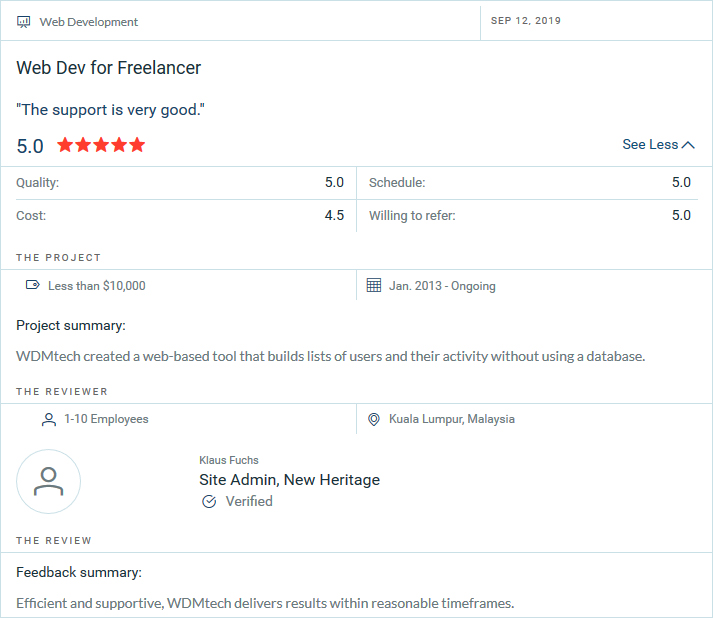
We got a slow start with very few projects in the first six months, but we were able to do them very professionally with a 100% success rate. After a year, the frequency of projects started increasing on UPWORK with much better options and features. The payment system is as powerful and secure as ever.

Now Upwork has millions of users, clients, freelancers and agencies connected to it. So, opportunities are much more than any time previously. With lots of projects in our hands, we have increased our team to 25. Today, we stand as an example to the world that one can strive, survive and drive business with clean hearts, minds and hands.

We are now having one of the best profiles on Upwork. We have completed hundreds of projects successfully.

https://www.upwork.com/agencies/~015823de7231e3b52c

We rely on Upwork so much that we always recommend it to our new clients from outside to register on upwork and then proceed with the projects because of the reliability, tracking of work and payment security.